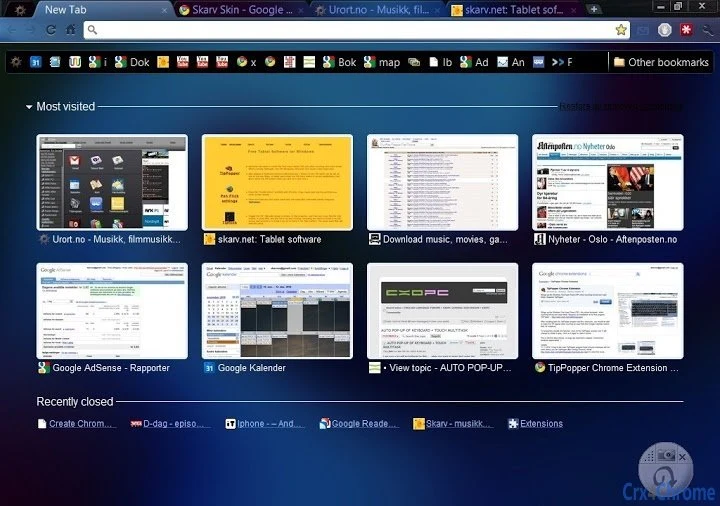

Elegant Dark Blue Chrome Theme
The software is a browser theme designed for Google Chrome, offering a visually striking dark and bluish interface. It aims to enhance the browsing experience by providing a sleek, modern aesthetic that reduces eye strain in low-light environments. This theme is suitable for users who prefer minimalist design and a calm visual atmosphere while navigating the web.
Target users include general consumers, digital creatives, and professionals seeking a more immersive browsing environment. The theme does not alter browser functionality but focuses solely on visual presentation. Real-world usage scenarios include extended browsing sessions, night-time web use, and users looking to personalize their browser appearance without performance overhead.
The developer did not provide additional information about their background or development history.
Key Features & Capabilities
- Dark and Bluish Color Scheme – Applies a cohesive dark base with subtle blue undertones across the browser’s interface, including tabs, toolbar, and background, creating a unified and calming visual experience.
- Eye Comfort Optimization – Designed to minimize screen glare and reduce visual fatigue during prolonged use, particularly beneficial in dimly lit or nighttime settings.
- Minimalist Design – Focuses on clean lines and uncluttered visuals, enhancing focus on content rather than interface elements.
- Seamless Integration with Chrome – Automatically adapts to Chrome’s layout and structure without requiring manual adjustments or browser modifications.
- Quick Installation – Can be applied directly through Chrome’s theme gallery with minimal steps, ensuring accessibility for users of all technical levels.
These features support users in achieving a more personalized and visually comfortable browsing environment. The theme is ideal for users who prioritize aesthetics and comfort during extended web sessions. It is especially useful for content creators, remote workers, and anyone who spends significant time online.
User Interface, Workflow & Performance
The theme modifies only the visual appearance of the Chrome browser, leaving core functionality unchanged. The interface remains consistent with Chrome’s standard layout, ensuring familiar navigation and workflow efficiency. Users can switch between themes quickly through Chrome’s settings, allowing for easy experimentation.
The UI structure is fully compatible with Chrome’s design language, maintaining consistency across all browser elements. No additional tools or menus are introduced, preserving a lightweight experience. The developer did not specify resource usage details, and performance observations are based on general software behavior patterns.
Stability is expected to be high, as the theme does not introduce new processes or background tasks. No known issues with CPU or RAM usage were reported.
Compatibility & System Requirements
The software is compatible with Windows and Mac operating systems. It is designed for use with Google Chrome, though the specific version requirements were not listed. The installation size is 1.5 MB, indicating a lightweight footprint.
Exact system requirements were not listed, and compatibility information was partially provided. Users should ensure their system meets Chrome’s baseline requirements for optimal performance. The theme does not require administrative privileges or additional software to function.
Pros and Cons
Pros
- Visually appealing dark and bluish interface
- Reduces eye strain during extended use
- Lightweight with minimal system impact
- Easy to install and apply
- Free to use with no hidden costs
Cons
- No customization options beyond the default theme
- Does not include additional functionality or tools
- Only available for Chrome, not other browsers
- Limited to visual changes; no performance improvements
- Developer information not publicly available
Is this theme compatible with my version of Chrome?
Compatibility depends on the Chrome version installed. The theme is designed for Chrome on Windows and Mac, but specific version requirements were not provided by the developer.
Is the theme safe to download and install?
Yes, the theme is distributed through official Chrome channels and does not include executable code or external dependencies. It poses no known security risks when installed from trusted sources.
Can I use this theme offline?
Once installed, the theme functions entirely offline. No internet connection is required to maintain the visual appearance.
How often does the theme receive updates?
Update frequency was not specified. Users should check Chrome’s theme library for new versions or changes.
What type of license does this theme have?
The software is free to use and does not require a license key. It is distributed under a permissive usage model without restrictions.
Final Thoughts
The dark and bluish Chrome theme delivers a refined visual experience tailored for users who value aesthetics and comfort. Its minimalist design and eye-friendly color palette make it well-suited for nighttime browsing and long sessions. While it does not add functional capabilities, it enhances the user’s interaction with the browser through thoughtful design.
The lack of customization options and limited scope are trade-offs for its simplicity and lightweight nature. For users seeking a clean, distraction-free browsing interface without performance costs, this theme is a solid choice. Download the latest version today.







